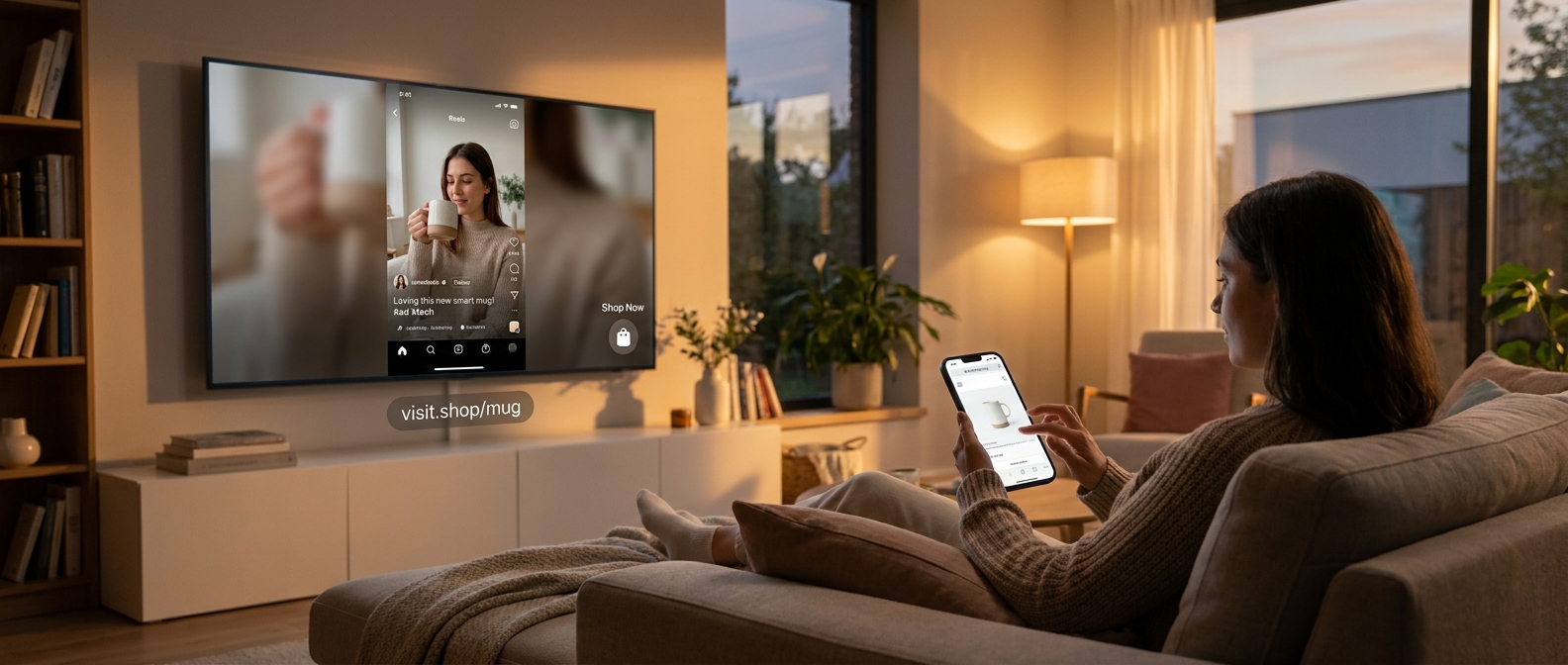
Your short videos may be doing great on phones, but that is no longer the whole game. More people are watching Reels, Shorts and creator content on the actual TV, from the couch, with a partner, during the exact part of the day when shopping decisions get made. If you are still editing only for a tiny vertical screen and a fast thumb tap, you are missing a very real shift. That is frustrating, especially for small brands and solo creators who already feel stretched thin. The good news is you do not need a fancy app, an agency, or a new ad budget. You just need a better plan for the big screen. Think of it as a connected tv social shopping strategy. The goal is simple. Make your content easy to watch from across the room, easy to remember, and easy to buy from after the video ends. That is the new TV cart, and smart creators are already building it quietly.
⚡ In a Hurry? Key Takeaways
- Connected TV is becoming shopping space, so creators need video made for couch viewing, not just phone viewing.
- Start with a simple TV Cart plan: bigger text, cleaner framing, repeatable product cues, and a dead-simple checkout path.
- You do not need new tools to test this. A few editing and landing-page changes can help you catch high-intent buyers before bigger brands do.
The big change most creators have not planned for
For years, social video meant one thing. A person alone, holding a phone, half paying attention, ready to tap in a second.
That picture is changing.
YouTube has been pushing harder into TV viewing for a while, and shopping features are following that audience. Instagram also wants more of its video watched on larger screens. Amazon, of course, wants every screen in the house to become a checkout lane. Put that together and you get a pretty clear message. Your videos are no longer living only in the palm of somebody’s hand.
They are showing up ten feet away, in a living room, next to snacks, side comments, and impulse buying moments.
That matters because people shop differently on the couch. They are less likely to read tiny text. Less likely to pause and squint. More likely to be influenced by what feels easy, familiar, and trusted. And if the platform gives them a quick path to buy, they may never visit your profile properly at all.
What “TV Cart” actually means
TV Cart is just a simple way to think about selling when your content is watched on a television.
It is not a new app
You do not need special software. You need to adapt how you package your content and your offer.
It is not traditional TV shopping
This is not late-night infomercial territory. It is short social video, but shaped for bigger screens and paired with easier paths to purchase.
It is a buying system
A good TV Cart setup does three jobs:
- It makes the video readable from across the room.
- It makes the product memorable after the video ends.
- It makes checkout simple when the viewer picks up their phone or clicks from the TV app.
Why living room viewers are worth your attention
Phone viewers are great for discovery. TV viewers can be great for intent.
Think about the setting. Evening hours. More relaxed attention. Often another person in the room. More time to let a demo play out. More openness to “Should we get this?” moments.
That is very different from somebody speed-scrolling at a red light or while standing in line for coffee.
And here is the part that should get every small business owner’s attention. Big-screen viewers often have a second device nearby. So the video can inspire the sale on TV, and the phone can close it. If your product name is hard to catch, your URL is clunky, or your call to action only works for someone tapping instantly, you lose that buyer.
The hidden problem with phone-first creative
A lot of high-performing short-form content is built around habits that break on TV.
Tiny captions
If your subtitles are stylish but small, they disappear on a larger screen viewed from a couch.
Fast cuts with no visual anchor
Quick edits can still work, but on TV the viewer needs a cleaner focal point. Too much motion turns into background noise.
Weak branding
If your logo, product shape, packaging, or store name barely appears, the viewer may like the video and still forget what to search for thirty seconds later.
Calls to action built for thumb tapping
“Tap here” is not much help when the person is holding a remote.
The practical TV Cart framework
Here is the simple framework I would use if I ran a small creator brand today.
1. Make the first three seconds TV-safe
Start with one clear visual idea. Show the product fast. Keep the frame uncluttered. If there is text, make it large enough to read from across a room.
A good test is easy. Put your phone on a table, step back eight to ten feet, and play your video. If you cannot instantly tell what is being sold, fix that first.
2. Build “search memory” into the video
On connected TV, not every purchase starts with a click. Some start with recall.
That means your brand name, product name, or signature phrase should appear clearly and more than once. Not in an annoying way. Just enough that someone can remember it when they grab their phone.
Examples:
- Show the product packaging clearly.
- Use a spoken product name out loud.
- Put a short, readable on-screen brand cue near the middle and end.
3. Stop relying on tiny bottom-of-screen captions
Captions still matter. Just make them bigger and cleaner. Avoid stacking too much text low on the frame where TV interfaces may cover it.
Use short lines. High contrast. Fewer words.
4. Design for “watch together” moments
On TV, your viewer may not be alone. That changes what works.
Questions, side-by-side comparisons, before-and-after shots, and simple demos work well because they invite conversation. “Would this help us?” is a stronger buying trigger than a lone silent like.
5. Create a no-friction path to buy
This is where the connected tv social shopping strategy becomes real.
Your path to purchase should be painfully simple. If the platform offers on-screen shopping features, use them. If not, make sure your profile link, pinned comment, product page, and store naming are all easy to remember and easy to type.
A good product page for TV-inspired buyers has:
- A short URL or easy brand search term.
- The same visuals from the video.
- The same product name used in the video.
- A clean mobile checkout.
6. Use repeatable creative templates
You do not need to remake your whole content strategy. Build two or three formats that are TV-friendly and keep using them.
For example:
- Problem, demo, result.
- Three benefits, one proof point, one call to action.
- Reaction opener, clear product shot, social proof.
How YouTube, Instagram and Amazon are pushing this forward
The platforms are not waiting around. They are trying to connect watching and buying more tightly because that is where the money is.
YouTube
YouTube has a huge TV audience already, and shopping tools are moving closer to the screen. Features like easier product discovery and quick purchase flows, including options tied to Google Pay, matter because they reduce the number of steps between “that looks useful” and “I bought it.”
Instagram still belongs to the short-video world, but its interest in getting Reels watched beyond the phone should be a wake-up call. If your Reel only works when a viewer is inches away from the screen, you are planning for the old version of the platform.
Amazon
Amazon has been teaching people for years that media and shopping belong in the same room. Once viewers get used to seeing products, reviews, and checkout paths connected across screens, they expect every brand experience to feel just as smooth.
Small creators have an advantage here
This is the nice surprise. You are not too late. In some ways, you are early.
Big brands often move slowly. They have teams, approvals, and expensive creative that may still be built for either polished ads or phone-first social. Smaller creators can test quickly. They can change caption size today. They can pin better product comments tonight. They can rename products for easier recall this week.
That speed matters more than perfect production.
What to change this week, not someday
If you want a quick start, do these five things first.
Audit your top 10 short videos on a TV
Cast them to a television and watch like a customer would. Can you read the text? Can you tell what the product is? Can you remember the brand name?
Rewrite your calls to action
Replace “tap now” with language that also works from the couch. Try things like “Search for,” “Find it in our bio,” or “Look for the product name on our store.”
Clean up your product naming
If your item names are clever but forgettable, simplify them. TV viewers need names they can recall fast.
Match the landing page to the video
If the product page looks nothing like the content that inspired the click, people bounce. Keep the same headline, visuals, and promise.
Track couch-driven behavior
Look for evening traffic spikes, direct brand searches after video posts, and increases in people typing your URL or store name directly. Not every TV-driven sale will show up as a neat little attributed click.
Common mistakes to avoid
There are a few traps I would skip.
Do not overstuff the screen
One message beats five. The larger the screen, the more obvious clutter becomes.
Do not assume vertical solves everything
Vertical video can still work on TV apps, but composition matters more now. Keep the center of the frame doing the heavy lifting.
Do not make checkout feel like homework
The longer the path, the more likely the sale goes to a platform-native option or a better-prepared competitor.
Do not wait for a perfect platform feature
You can improve your TV Cart setup before every app finishes rolling out its dream shopping tools.
At a Glance: Comparison
| Feature/Aspect | Details | Verdict |
|---|---|---|
| Phone-first Shorts/Reels | Works well for quick attention and taps, but often uses tiny text, weak recall, and mobile-only calls to action. | Still useful, but no longer enough on its own. |
| TV Cart content setup | Uses larger text, clearer product framing, stronger brand memory, and easy second-screen checkout paths. | Best low-cost upgrade for creators who sell. |
| Platform-native TV shopping tools | YouTube, Instagram, and Amazon are steadily connecting big-screen viewing with product discovery and faster checkout. | Important to watch closely and use where available. |
Conclusion
The shift is quiet, but it is real. Social platforms are racing to make living room viewing shoppable, from YouTube’s easier TV buying flow with Google Pay to Instagram’s push for more big-screen video watching. If creators keep making everything for vertical, thumb-tapping viewers only, they are going to lose a slice of high-intent purchases to brands that understand how people shop from the couch. The good news is this is not a rich-company-only move. A practical TV Cart framework gives small creators and indie brands a way to catch those living-room orders without new tools, agencies, or paid media. Start with clearer visuals, stronger recall, and a simpler path to buy. Do that now, and today’s quiet connected TV changes can become tomorrow’s repeat customers instead of one-off impulse clicks.